Read About the latest SEO News and Updates

Tuesday, September 18, 2018

Best practices for mobile-first indexing

Mobile-first indexing means Google will predominantly use the mobile version of the content for indexing and ranking. Historically, the index primarily used the desktop version of a page's content when evaluating the relevance of a page to a user's query. Since the majority of users now access Google via a mobile device, the index will primarily use the mobile version of a page's content going forward. We aren't creating a separate mobile-first index. We continue to use only one index.
With mobile-first indexing, Googlebot primarily crawls and indexes pages with the smartphone agent. We will continue to show the URL that is the most appropriate to users (whether it's a desktop or mobile URL) in Search results.
As we said, we transition sites slowly to ensure a good experience for site owners and users. We evaluate each site individually on its readiness for mobile-first indexing based on the best practices and transition the site when the site is ready.

What's changing

If you have this type of site...

Desktop only

Your site is desktop only and doesn't have a mobile-friendly version.
No change. The mobile version is the same as the desktop version.

Responsive web design

No change. The mobile version is the same as the desktop version.

Canonical AMP

All your web pages are created in AMP HTML.
No change. The mobile version is the same as the desktop version.

Separate URLs

Each desktop URL has an equivalent different URL thatserves mobile-optimized content. This site type is also known as an m-dot site.
Google prefers the mobile URL for indexing. To prepare for mobile-first indexing, follow our best practices.

Dynamic serving

Your site serves different content based on the user's device. Users only see one URL.
Google prefers the mobile optimized content for indexing. To prepare for mobile-first indexing, follow our best practices.

AMP and non-AMP

Your site has both AMP and non-AMP versions of a page. Users see two different URLs.
Google prefers the mobile version of the non-AMP URL for indexing. If your non-AMP mobile version uses dynamic serving or separate URLs, follow our best practices.

Best practices for dynamic serving and separate URLs

If your site has separate desktop and mobile content, which means you have a dynamic serving or separate URLs (or m-dot) site, make sure you follow the best practices below to prepare for mobile-first indexing:
  • Your mobile site should contain the same content as your desktop site. If your mobile site has less content than your desktop site, you should consider updating your mobile site so that its primary content is equivalent with your desktop site. This includes text, images (with alt-attributes), and videos – in the usual crawlable and indexable formats.
  • Structured data should be present on both versions of your site. Make sure URLs in the structured data on the mobile versions are updated to the mobile URLs. If you use Data Highlighter to provide structured data, regularly check the Data Highlighter dashboard for extraction errors.
  • Metadata should be present on both versions of the site. Make sure that titles and meta descriptions are equivalent across both versions of your site.

Additional best practices for separate URLs

If your site has separate URLs (also known as m-dot), there are additional best practices you should follow.
  • Verify both versions of your site in Search Console to make sure you have access to data and messages for both versions. Your site may experience a data shift when Google switches to mobile-first indexing for your site.
  • Check hreflang links on separate URLs. When you use rel=hreflang link elements forinternationalization, link between mobile and desktop URLs separately. Your mobile URLs' hreflang should point to mobile URLs, and similarly desktop URL hreflang should point to desktop URLs.
  • Ensure your servers have enough capacity to a handle potential increase in crawl rate on the mobile version of your site.
  • Verify that your robots.txt directives work as you intended for both versions of your site. The robots.txt file lets site owners specify which parts of a website may be crawled or not. In most cases, sites should use the same directives for both mobile and desktop versions of their sites.
  • Make sure you have the correct rel=canonical and rel=alternate link elements between your mobile and desktop versions.

Tuesday, May 22, 2018

Will Change in WordPress Themes Affect Your SEO Results?

The answer to the question “does changing WordPress Themes Affect Your SEO Results” remains dynamic and is dependent entirely on the situations that it passes through. Changing WordPress website themes can affect the SEO results of your WordPress website as well as WordPress blog, whether it changes  SEO positively or negatively depends on the process. 
Most WordPress professionals are experts at doing magic with PHP and CSS, but when it comes to SEO, they probably fail
When handling a WordPress website, you need check whether the SEO of your website is handled by a plugin or a particular WordPress theme. There are various kinds of WordPress themes and plugins for SEO. It depends entirely on the SEO plugin if it helps or hinders your SEO. 
While changing your WordPress theme, there are certain things that you need to keep in mind for your website.  One important thing,is that you can not just expect it to provide great SEO results to your WordPress website, but you need to do some investigation of your new chosen theme.
As an example, WordPress Thesis theme has certain SEO features to handle the ranking of your website for search engine results. Also, with Thesis theme, you do not need to use SEO plugins as changing the theme on a frequent basis can again have some negative impacts on your WordPress website. The theme framework is preferable as it takes care of all minor changes and the little things about the SEO of your website.
While changing the WordPress theme, your website may come up with various issues. Read on to find out those changes in custom settings!

How Changing WordPress Themes Affect Your SEO Results

  • Loss of Custom Theme Settings
When you switch your theme and you are unaware of the performance of your the new theme, you may end up losing all your custom theme settings. Your new theme may or may not contain the features from your old theme. The reason behind this may be the different ways of coding used in the themes, so you get different functionality and design. 
You will find the difference in the order your website gets loaded. For instance, one of them will load the sidebars first and then post the body. Whereas, the other will load the body first and then will go for the sidebars.
While changing the theme of your website, if you have not checked the functioning of the theme, you may suffer such changes on your website which, in turn will result you with changes in the loading time of your website.
Why does this matter? If the loading time is increased, you will ultimately end up getting negative impacts on your SEO results. Make sure to check the performance before switching to your new theme! 
  • Changes in the Heading tags
When changing the WordPress theme, you must find out the heading tags for the post titles used in the theme you are selecting. The tags for which your post titles are used or hyperlinked will affect the overall SEO of your WordPress website. When changing the theme of your WordPress website, you should have studied this aspect of theme. 
  • Having a Backup is Always A Great Option
Whenever planning to change the theme, making a backup is a must for any WordPress Development Company. Make sure to you must take the backup of your website’s theme and database before migrating it to the SEO plugin. There are a lot of SEO plugins out there that contains inbuilt SEO settings to which you can store your backup and continue your process of changing the WordPress theme without any changes in your SEO settings.
When you have saved the backup of your theme, you can make use of the last theme if the working of the new theme does not go right. There are times when after changing the theme, you find that you do not like to work with the new theme. At this time, you can make use of the backup that has been saved from the last theme. This shouldn’t affect your SEO results, but you may notice some fluctuations in the SEO ranking of your website. After the initial fluctuations, it will return to your original SEO results. Hence, having a backup of the recent theme is a great option to have a perfect website working with the WordPress platform.
  • SEO Friendly Theme Should be Preferred
WordPress platform contains a huge variety of beautiful themes, but when it comes to SEO friendly WordPress theme, very few of them seem to show positive results. Some of them come with fantastic design features, but lack in clean and SEO friendly coding. Hence, for making a perfectly SEO-friendly website, you should select the theme which has certain in-built features to enhance the SEO ranking of your website.
Once done with changing, make sure you have previewed the newest WordPress theme before it goes live on your website. With these, you can look for the bugs or errors in the latest version. There are certain tools available for detecting the error or the bugs happening to the updated website theme.
Change in theme affects your SEO results, but whether to bring those changes in a positive or a negative way is totally dependent on the selection of the WordPress theme. If chosen smartly, it will have drastic positive effects on your SEO, and if not, it can also ruin the recent ranking of your WordPress Website. All of it depends on the selection of your WordPress theme.
The functioning of the theme you select is the only thing that makes the difference in the working of your website and in the SEO results of the website. So, have a concrete checklist before rushing to look for the next WordPress theme for your website and follow it to get an exact and appropriate theme based on your requirements and budget.
Remember that selecting your WordPress theme smartly will lead you to better SEO rankings!

Thursday, April 5, 2018

Google begins rolling out mobile-first indexing to more sites

Sites that follow the best practices for mobile-first indexing will be migrating over now, and Google will send notifications via Search Console.

Google has announced that it has begun the process of rolling out the mobile-first indexing to more sites. This rollout is only for sites that “follow the best practices for mobile-first indexing,” Google said.
This is the first time Google has confirmed it is moving a large number of sites to this mobile-first indexing process. Google did tell us last October that a limited number of sites had been moved over. But this Google announcement makes it sound like the process of mobile-first indexing on a larger scale has already begun.
Google did say it will notify webmasters/site owners that their sites are migrated to the mobile-first indexing process via messages in the Google Search Console. Here is a screen shot of a notification:


Google also said “site owners will see significantly increased crawl rate from the Smartphone Googlebot. Additionally, Google will show the mobile version of pages in Search results and Google cached pages.”

What is mobile-first indexing?

Google says it is about how Google crawls your site. Google will only have one index, but how Google crawls and creates the index will be based on a mobile-first experience going forward. Google wrote:
To recap, our crawling, indexing, and ranking systems have typically used the desktop version of a page’s content, which may cause issues for mobile searchers when that version is vastly different from the mobile version. Mobile-first indexing means that we’ll use the mobile version of the page for indexing and ranking, to better help our — primarily mobile — users find what they’re looking for.
Google has a detailed developer document on mobile-first indexing. Also make sure to check out our FAQs on mobile-first indexing.

Resource URL: https://searchengineland.com/google-begins-rolling-out-mobile-first-indexing-to-more-sites-295095

Monday, January 8, 2018

20 Common English Mistakes Made by Indian People

Depending on whether you are a native speaker or not, the English language can either be hard or simple to learn. Most non-native speakers consider it hard to learn especially in situation where they get introduced to the same at a very late stage in life. In as much as the native English speakers are assumed to have an easier time with the English language, not everyone can claim to have mastery on the same. As a matter of fact, most of them speak the language without a proper consideration on the grammar and words work.
Depending on what are your preferences, you can choose to either learn the British or the American English versions which are the most popular. Other versions include: the Canadian version, the Australian and the New Zealand version to name but a few. All these versions are slightly different from one another in terms of their grammar rules and in some case the spelling of words. To a typical non-native, all these can be overwhelming and confusing at the same time. This makes it hard for anyone who is willing to learn the language. In fact, some people attribute their countless mistakes to having such disparities in the versions.
In this piece, we’ll pay much of our attention to the Indian people as we try to explore some of the common mistakes they make in relation to the English language.


Get vs. Gets

A very common mistake made by the Indians which sees them adding the word ”s” to words unnecessarily.
Example: Unless you gets your act right
This is wrong. Unless the words ”you” is replaced by ”he” and ”your” replaced by ”his”. Better yet you cab drop the letter ”s” from ”gets”.

Their vs. There

More often than not, these words are misused. ”Their” refers to people whereas ”there” is used to refer to places.
Example: I have been there.
They came with their goods.

Misuse of a comma

The main purpose of a comma in a sentence should be to indicate a pause in a long sentence or split a list of items mentioned. When a sentence is split, it accounts to the misuse of a comma.
Example: It takes him all day, to drive home.
This is referred to as sentence splitting and is in fact wrong. The comma basically confuses the sentence and creates what is commonly referred to as sentence fragments.

Blunder vs. Mistake

These two words basically mean the same thing and can never be used in a sentence at the same time.
Example: You have made a blunder mistake
This is wrong because the sentence actually means, ”You have made a mistake mistake.”  It can either be ”You have made a mistake” or ”You have made a blunder”.

More vs. Better

At no point should they be used together in a sentence.
Example: This could never have turned out to be more better.
The word better in itself implies superiority hence the use of the word ”more” in the sentence is seen as being unnecessary.

Does vs. Do

”Does” is used in singular form while ”Do” indicates the plural nature of the subject.
Example: Why does he bother you a lot?
Why do they bother you a lot?

Which vs. That

One of the most popular mistakes that cuts across all nationalities. ”That” should be used as a restrictive pronoun while ”Which” should be used as a relative pronoun to imply the available options. In a nutshell, ”Which” defines and ”That” limits.
Example: I never watch movies that are not HD.  This means that you limit yourself to HD movies.
I only watch HD movies which are available on DVD. It means that you can watch HD movies available on DVD and do not have to download them.

Who vs. Whom

As a subjective pronoun, ”Who” is used in situations where a pronoun acts as the subject of a particular sentence. On the other hand, ”Whom” is used as an objective pronoun and used whenever a pronoun acts as an object in a sentence.
Example: Who is she?
To whom was the assignment given?

Putting a comma before the word ”that”

This is a very common grammar mistake made by Indians. There is a school of thought of the opinion that, ”that” should never have a comma before it while other provide for some discretion in certain scenarios.
Example: I did not think, that they were wrong.
This is wrong.

Un-capitalized words at the beginning of a quotation mark

Every time you start a quotation mark, it must be followed by a capital letter.
Example: He said, ”Get up and head to school.”

Forgetting to put a question mark

This mostly happens in sentences that do not begin with ”Why”, ”What”, ”How”, ”Who”, and ”When”.
Example: Are they not going to come back.
That is wrong. The sentence needs to end with a question mark.

Place vs. Plaice

This is a very common spelling mistake.  ”Place” refers to a certain location or position while ”Plaice” is some type of fish.
Example: He took the first place.
Who needs a plaice?

Accept vs. Except

When spoken, these words sound almost the same and can be confusing to non-natives. ”Accept” means to agree to take something that’s being offered while ”Except” means with the exclusion of something.
Example: Kindly accept this as a token of appreciation.
The book is new except the cover.

Its and it’s

”Its” is used to show possession while ”it’s” is the short version of ”it is”.
Example: It’s broken.
The vehicle broke its windscreen.

Envy vs. Jealousy

”Envy” is used to imply the pursuit to someone else’s success whereas ”Jealousy” has a much more negative meaning implying a fear of competition.
Example: I envy you with all your success.
His jealous nature contributed to his poor judgement.

May vs. Might

”May” is normally used to imply a possibility while ”Might” refers to uncertainty.
Example: Two shots may get you drunk.
It might rain today.

Fewer vs. Less

”Fewer” is mostly used on items that can be counted while ”Less” is used for hypothetical quantities.
Example: Today, the market has fewer people.
Last year the company was less successful.

Since vs. Because

”Since” refers to time while ”Because” is used to refer to causality.
Example: Since I started drinking, I’ve lost around 10 cell phones.
Because I’m highly intoxicated, I’ll not drive.

Bring vs. Take

The use of these two words basically depends on whether the object is moving towards or away from you.
Example: Take this to your mother.
Bring it to me.

Averse vs. Adverse

”Adverse” is used to refer to unfavourable while ”Averse” refers to the state of being reluctant.
Example: The adverse effects of tobacco.

A good number of people are averse to sleep at work.

Resource URL: http://englishharmony.com/20-common-indian-english-mistakes/

Wednesday, August 30, 2017

Google says we don’t need no stinking location modifiers… or do we?

Google recently stated that users are beginning to drop location qualifiers when searching for local businesses. But is it time for local SEOs to stop focusing on these terms?

Last week, Google declared that the “near me” search query and other “geo-modifiers” (e.g., ZIP code, city name) were, if not dead, then certainly not worth spending your valuable SEO time worrying too much about:
In September 2015, we shared that “near me” or “nearby” searches on Google had grown 2X in the previous year. Now, just two years later, we see that behavior has continued to change. Make no mistake, people still use ”near me” to discover places of interest around them. But we’re now seeing a shift toward dropping location qualifiers (like zip [sic] codes, neighborhoods, and “near me” phrasing) in local searches, because people know that the results will automatically be relevant to their location — thanks to their phone. It’s kind of magical. In fact, this year, search volume for local places without the qualifier “near me” has actually outgrown comparable searches that do include ”near me.” [see data] Over the last two years, comparable searches without “near me” have grown by 150% [see data].
But, as you can see through Google Trends, it’s not just that “implicit” local search queries (searches for local places without the local qualifier) are growing rapidly — it’s that they have always had a much higher base volume as well.

Source: Google Trends
So, we get it — the search term “tacos” is a better term to target than “tacos costa mesa.” However, Google treats implicit/explicit/”near me” searches differently. Just look at these different results (searches were all done from the same location with an incognito browser):
Tacos (located in Costa Mesa, CA)

Tacos Costa Mesa

Costa Mesa Tacos

Tacos Near Me (located in Costa Mesa)

While there’s overlap, literally none of the results above are the same. That tells us that Google evaluates all of these queries differently. Not only that, but according to our 2016 Local SEO Ranking Factors study (2017 version coming soon), it looks like Google is looking at different ranking factors as well.
Here’s how various factors correlated with high rankings in the Local Pack for implicit and explicit local search queries:

So, this requires a more holistic approach to location-based SEO. Local SEO isn’t just about fixing data accuracy problems, it’s about making sure that clients are effectively optimized for the myriad terms and paths that will generate them business.
That means implicit geo-location queries like “tacos” may have the highest search volume and best growth opportunity, but if you’re skipping other term variations, you are leaving money on the table.
For example, here is the monthly search volume for these searches in Pleasanton, Calif.:
Tacos — 210
Tacos Near Me — 140
Tacos Costa Mesa — 50
Costa Mesa Tacos — 10
If you are only focusing on “tacos,” that’s 210 monthly searches, or 51 percent of the potential traffic out there for core taco-related terms (and there are likely hundreds of long-tail “taco” queries for a city, each with their own unique results). Now, start applying that to, say, a 100-location business, and that’s 21,000 potential customers you are trusting Google to send to the right place.
This is part of the reason why we treat ALL these terms as a “taco” search. Because given the particular searcher, their search behavior, and proximity to your location, they could theoretically be engaging in any of these searches.
By the way, the #1 tacos-related search term?
Tacos Nearby — 590

So I wouldn’t abandon “near me” optimizations just yet.

Source URL: http://searchengineland.com/google-says-dont-need-no-stinking-location-modifiers-281428

Friday, August 25, 2017

Phrase match is dead. Long live phrase match!

Reports of the demise of phrase match have been greatly exaggerated, finds contributor Steve Cameron. It turns out that there are certain situations in which it comes in pretty handy. 

When Google launched their broad match modified match type some years ago, some marketers hailed the demise of phrase match as something of a foregone conclusion.
Many, ourselves included, quickly shifted gears and rolled out new campaigns using a combination of broad match modified (BMM), exact match and negative match keywords. And others did not.
Let’s consider why we did this. First — and this should be writ large wherever AdWords advertisers congregate — no one likes broad match. No one except, perhaps, Google.
Using broad match is essentially lazy, the equivalent of holding out your hand with all your money it in and letting Google take what they want. They’re getting better — broad match is nowhere near as bad as it used to be — but it still allows Google a freedom you wouldn’t want your car mechanic or your electrician to have.
As a result, many advertisers instead opted for phrase match and exact match for their keywords, often having to develop hundreds of phrase match keywords to cover a multitude of possible search terms. For example, if we were trying to promote our blue widgets, we might start with “blue widgets” as a search term but soon have to add “widgets in blue,” “blue color widgets,” and so on.
With the introduction of BMM, advertisers were suddenly able to cover hundreds of possible search terms by simply using +blue +widgets. In our agency, we then monitor the Search Query Performance reports, pull out those search terms that deserve special attention and move them directly into exact match status, thus making the intermediate phrase match version redundant.
This streamlines the process and, with new build campaigns, seems to be the simplest way to get campaigns live and generating real data. We can then crunch this data faster to get to the kernels of optimization that will drive ongoing success.

Phrase match is still holding its own

We reached out to other marketers to discover how phrase match fits into their account management approach and found that reports of phrase match’s demise may be a little premature.
As Mark Kennedy from SEOM Interactive comments:
“While the changes to match types over the last few months have leant towards the demise of phrase match, it still has its place. I won’t remove it from older accounts where phrase match KWs have good history and conversion value (although I will prune those with no value). And if they are in accounts where ad groups are broken out by match type, I tend to keep them as well — again, especially where there is historical data. The other time I use them is when I am mining search query reports for converting phrases that I want to test. So I’ll use different match types on these new terms (including phrase match) to see what performs well. So while phrase match isn’t ‘necessary’ anymore we haven’t taken it totally out of the utility belt.”
Kennedy’s comments about historical value are particularly significant. Google loves historical data — especially when it comes to Quality Score, for example, and it could take a new BMM keyword some time to achieve a high QS already enjoyed by a long-term phrase match keyword that has consistently performed well.
While others echo these sentiments, Julie Friedman Bacchini of Neptune Moon feels that keyword matching is becoming increasingly fuzzier. She cites the changes in the keyword planner where match types are no longer segmented as an indication of the way Google sees match types. Coupled with the ending of the close variant opt out, the battle lines between marketers and the search engines are blurring. Interestingly, she concludes:
“It’s a little ironic, really, because it seems like now more than ever true phrase match would be helpful to advertisers. With matching getting fuzzier, the ability to zero in on a particular phrase or way of expressing a search term without having to sculpt it with negatives would be welcomed by many, I suspect!”
James Svoboda, partner at WebRanking, also agrees that the close variant rollout last year essentially made phrase match and Broad Match Modified the same with one significant exception: word order.
He explains:
“Since we typically see similar results for search terms containing the same words, but in different word order, such as PPC Agency Minneapolis and Minneapolis PPC Agency, both of which can be targeted using one BMM Keyword: +Minneapolis +PPC +Agency, we’ve opted to simplify our account structure by using BMM instead of phrase match for most keywords. There are a few case-by-case situations that may arise where word order has a significant impact on performance, such “Used Cars” and “Cars Used” where the first one typically will be used by searchers with queries for preowned vehicles and the second one by searchers looking for cars used for specific tasks such as: cars used for off-roading. Even in these cases, we can use Negative Keywords to shape the queries that we are targeting through BMM Keywords.”
As a result, they have effectively removed phrase match from their arsenal and are looking forward to the day when both Google and Bing follow suit.
Whether that day will ever come is debatable. There are, perhaps, too many accounts that have been built and optimized over the years around a solid core of well-performing phrase match keywords. And, since phrase match isn’t broken, there may be no reason to try to fix it.
And for some of us, like Gil Hong from Seer, phrase match may simply be a habit that is hard to shake:
“I still use phrase match! Partly out of habit of how I build campaigns in Excel, and in some instances, phrase match still has a place for specific keyword intent.”
The consensus, therefore, seems to be that there is some life in phrase match after all. Where a well-performing phrase match keyword with great historical data and a good Quality Score is present, it could take some time for a Broad Match Modified keyword to catch up — and indeed, it would be hard to imagine the performance ever quite being matched. But where there are well-performing phrase match keywords, there are Exact Match versions willing and eager to usurp them.

So poor phrase match is getting pressure from both sides, and while it might be able to hold its own for the time being based on past glories, going forward, its days are still probably numbered. But then, we said that a couple of years ago!

Tuesday, August 22, 2017

Load time, static site generators & SEO: How we lowered our own site’s load time by 74%

Google's upcoming transition to mobile-first indexing, combined with its raised expectation of mobile site performance, should convince site owners to consider static site generation. 


Google has raised the bar on site load times consistently over the last decade, and the upcoming transition to mobile-first indexing, combined with its rising expectations of mobile site performance, should be a clear warning sign to site owners.
Site owners generally, however, seem not to be listening.
Unfortunately, based on our analysis of 10,000+ mobile web domains, we found that most mobile sites don’t meet this bar: The average load time for mobile sites is 19 seconds over 3G connections.
DoubleClick research published in September 2016
At our company, we have been experimenting over the last year with static site generation. Our tests on our own site are aimed at allowing us to assess the challenges facing site owners, to understand the scope of opportunity and potential for performance improvement, and also to explore the practical limitations in content management — one of the key criticisms of static site generation.
Our site, QueryClick.com, was a small, fairly well-optimized B2B site, but it averaged ~6.99 second load time in the month prior to our deployment of static site generation (July 2016), dropping to ~1.8 seconds in the month following. That represented a load time reduction of 74.29 percent, despite some server response issues experienced during the period we were actively developing the site.

One month before and after switching to a static site generation infrastructure.
We performed further server optimization improvements over the year, reaching our sub-one-second mobile device target even while testing the impact of less efficient elements driven by JavaScript.

Yes, we know! We didn’t even use sprites, gzipping, or other such techniques — which highlights the impact of a platform-first approach to solving the page speed problem.

A platform-first approach to page speed

I’ve written before about the varying levels of importance of the different aspects of page speed on SEO and about how Google’s algorithm employs data about SERP bounce-backs (when users bounce back to its SERPs after losing patience with a slow-loading site). But it’s worth making the point again as we head to a mobile-first world: server response times and the critical render path event (the point at which everything in the initial device viewport is rendered) are key to delivering high-performance SEO, especially for enterprise-level sites.
Any developer worth their salt will look at the asset load requests in QueryClick’s site displayed in the above image and shake their head at all the unoptimized elements. But that is the point. High performance was achieved despite a lack of rigorous optimization in the code and asset deployment. It was driven by the platform and the high-level architecture decisions.

Google would like us to improve further — and we will, but real performance change has already been delivered.
So, what architecture did we use? As Python and Django evangelists, we write the copy in Markdown and push it to our staging server build via Github, where we can check to ensure it’s all OK. We then use Celery to set a time for the staging server copy to be pushed to the live Git repository. Then, Cactus regenerates the pages and, voila, the live server is populated with the static pages.
Of course, for your average content producer, this infrastructure is not as simple to create or maintain as a standard CMS without some technical know-how. That is the most common criticism of static site deployments, and many enterprise clients consider it a deal-breaker when they’re looking at static site solutions.
Certainly, if you manage product inventory that dynamically changes by tens of thousand in a day, which one of our clients does, then a robust management back end is essential.
That’s why anyone deploying a static site performance solution in the enterprise must leverage Oracle ATG or the like, which can easily generate and manipulate static web pages using its API. When you think about it, live dynamic site management requires significantly more hardware infrastructure than static.
If you need more convincing, take a look at the variety of static code bases already in flight. They use a variety of programming languages and many of them are fully capable of being fitted into an enterprise environment. When you also use a content delivery network (CDN) in production, you can offer a robust solution that delivers both blazing speed (for even poor 3G mobile connections) and total redundancy and elimination of server failure challenges.
Dynamic static asset provision and modern caching controls on static generators allow clean, live adjustment of content that is exactly comparable to dynamic site generation at a fraction of the hardware demand.
It may take years for the general web to catch up with Google’s pioneering push for modern, fast, easy-anywhere web experiences. But if you want to benefit your conversion rate and your brand experience, and enjoy a significant drive to SEO performance thanks to fast critical render performance and positive SERP bounce behavior, then you should have your development team investigate and find an architecture that works for your site today.

Source URL: http://searchengineland.com/load-time-static-site-generators-seo-280785

Wednesday, April 12, 2017

Website Uses it's name in URL on Google Search Results

While I was searching for a keywords "seo services in delhi ncr", I found a results with totally unique URL listed in Google search results. I was little surprised to see the listed URL structure. Here is the screenshot for that unique URL structure:


It was the 1st time when I found this type of URL in Google search results so I was excited to know how it can be done. So I have started researching on it and found that it was an older Google update which happened in 16th April 2015 named "Google Replaces A Site’s URL In Search Results & Uses Its Site Name & Breadcrumb Path".

I realized that there are many such minor updates which happens in between and we miss them as we always focus on the major updates like penguine, panda etc. I am sure if we have a close eye on each minor updates like this then we will become a leader in the industry. As there are very few people in SEO industry have close eyes on such minor updates so they never gets benefits of these changes happen to their clients websites.

And if we get such minor updates then we should also implement the websites accordingly to understand the way how to implement them for a website. It can be a attraction to the users and clients as well.

For today I think it's enough to write on blog. I am still in the implementation stage for this update and once I get anything different on Google then I will share my another blog post.

Thanks for reading my blog. Your comments with your questions will be appreciated.

Wednesday, March 11, 2015

SEO: Understanding Pandas, Penguins, and Pigeons

You probably didn’t realize that animals would affect your website and your business. The three Google search algorithms having the biggest impact in the past three years are a bear and two birds: Panda, Penguin, and Pigeon.
Google’s algorithms are designed to emphasize quality websites while pushing down, in search results, low-quality sites. Google’s efforts are admirable, especially since Google is the most-used search engine.
What is harder to deal with is that a small group of people — Google employees who manage search algorithms — often cause a lot of hardship. Changes to search algorithms can greatly reduce business revenue and increase expenses. Revenue is typically reduced when a website’s ranking (and, thus, traffic) is lowered. Expenses can increase when businesses spend money to make corrections, to address the algorithm changes.
Google’s algorithm changes are designed to emphasize quality websites while pushing down, in search results, low-quality sites.
We could spend a lot of time fretting about these changes or we can push forward. Accepting the changes and objectively making corrective decisions is a better use of time. Moreover, web marketing has no endpoint and change is inevitable.
Let’s take a look at each of Google’s pets — i.e., algorithms — to better understand them and their impact on your business. Note that for purposes of this article, I am defining “low rank” as a ranking position in search results of 10 and beyond.

Panda Algorithm

Google released Panda in February 2011. The algorithm was aimed to make low-quality or thin sites less visible in search results and rank them lower.
The Google Panda U.S. patent states there is a ratio with a website’s inbound links and search queries for the website’s brand, products, and services. The ratio is used to create a modification factor affecting the entire website, not just individual pages. If the page fails to meet a certain mathematical threshold, the modification factor is applied and the website would rank lower in the search engine results page.
When we talk about low-quality websites, there are a few important factors to keep in mind.
  • Duplicate content within your website is an important issue that is not only about meta tags, but the visible content as well. Having web pages with the same title tag and meta description will hurt your rankings.
  • The visible content has to be of value to the visitors. Keyword density percentages are important as well as the web page’s readability score. Flesch-Kincaid and Flesch Reading Ease are two methods of determining readability scores. The more the web page can cater to the general public, the more likely it will meet a quality level based on a mathematical equation.
  • Fresh content that is helping to build the overall density of pages of your website is important. This is where “thin websites” that do not have enough content or for that matter websites that do not have fresh pages are negatively impacted.
To meet these requirements, consider using Google’s Webmaster Tools. Unlike Google Analytics, Google Webmaster Tools identifies problems with your website, from Google’s perspective.
Another consideration is to secure the services of writers and or marketers who can interpret the findings and make changes to help your website’s quality. A technical website developer is not necessarily the right discipline you need in this case.
A material update to Panda occurred in May 2014, with Panda 4.0. This algorithm is here to stay and keeps getting updated.

Penguin Algorithm

Google’s Penguin algorithm addresses inbound link quality.
Google implemented Penguin in April 2012. It is aimed at websites that violate Google’s guidelines by using so-called black-hat techniques — artificially increasing the ranking of a web page by manipulating the number of links pointing to it.
To avoid getting caught in the Penguin algorithm trap, you have to know if the websites linking to you are of quality. This means someone has to know how to determine the quality of websites based on metrics such as Google Page Rank, Alexa Traffic Rank, volume of pages indexed, and volume of links on the web. Quality over quantity is the key, which means someone actually has to research the information.
Using Google’s Webmaster Tools you can find out what websites are linking to you. Once you have that information you will be able to research metrics of these websites using publicly available automation tools to provide you their Google PageRank (a weighted average value from 0 to 10; the higher the better) and other information pertinent to determining their value.
Once you know which websites are of low quality you have two options.
  • Send the website a message and ask it to remove the link to yours.
  • Use Google’s Disavow Tool in Google’s Webmaster Tools to ask Google to not put this website into consideration as a link to your website.
Neither option will likely help your rankings right away. They are both time consuming.
The Penguin algorithm will likely be materially updated by the end of 2014, with version 3.0.

Pigeon Algorithm

Search Engine Land, the online magazine, reportedly first used the name “pigeon” for this new algorithm, which was implemented in July 2014. It designed to provide more useful and accurate local search results. Google stated that this new algorithm improves its distance and location ranking parameters.
The changes are visible in the Google Maps and Google web search results. It impacts local businesses, which may notice an increase or decrease in web site referrals and leads from this change.
Unlike Panda and Penguin, the Pigeon algorithm does not impose penalties. Its purpose is provide more accurate and relevant local search results.
Local business owners should consider these three points.
  • So-called website authority is an issue now because of Google’s search ranking signals. Map listings (i.e., local business listings) are now tied to your website’s authority. This in turn goes back to how Panda and Penguin algorithms are affecting your website.
  • Local business listings should be pin-code verified, updated, and continually maintained. Adding photos and videos and responding to ratings and reviews is important. Positive, legitimate ratings and reviews can only help.
  • Citations are important, which means you need to pin-code verify your listing at other sites beyond Google (such as Bing, YellowPages.com, Yelp, and the like) and be sure they are updated exactly the way your listing is at Google. Use automation services to help get the word out to over 200 other websites, which helps with the citation-building process.

Source URL: http://webmarketingtoday.com/articles/113316-SEO-Understanding-Pandas-Penguins-and-Pigeons/

Monday, June 23, 2014

Google Sandbox and Penalty Check

Deindexed - When your domain is completely removed from Google. Also known as Banned.
Penalized - When your domain or page still exists but none of your pages can be found through very direct search queries.  This penalty can be automatic through the Google algorithm or manually applied by a Google Quality Engineer.
Sandboxed - Your domain or page wasn't Deindexed or Penalized, but the traffic you were getting from Google suddenly drops dramatically.


Some tools for checking goggle penalized sites are given below:
http://pixelgroove.com/serp/sandbox_checker/
http://feinternational.com/website-penalty-indicator/
http://toolbox.gabblet.com/google-penalty-checker-tool-check.aspx

Tuesday, May 20, 2014

Google Begins Rolling Out Panda 4.0 Now

Matt Cutts have announced that Google is rolling out Panda 4.0 update starting today on 21st May 2014.


Google’s Matt Cutts announced on Twitter that they have released version 4.0 of the Google Panda algorithm.
Google’s Panda algorithm is designed to prevent sites with poor quality content from working their way into Google’s top search results.
But didn’t Google stop updating us on Panda refreshes and updates since they are monthly rolling updates? Yes, but this is a bigger update.
Panda 4.0 must be a major update to the actual algorithm versus just a data refresh. Meaning, Google has made changes to how Panda identifies sites and has released a new version of the algorithm today.
Is this the softer and gentler Panda algorithm? From talking to Google, it sounds like this update will be gentler for some sites, and lay the groundwork for future changes in that direction.
Google told us that Panda 4.0 affects different languages to different degrees. In English for example, the impact is ~7.5% of queries that are affected to a degree that a regular user might notice.
Here are the previous confirmed Panda updates, note, that we named them by each refresh and update, but 4.0 is how Google named this specific update:
  1. Panda Update 1, Feb. 24, 2011 (11.8% of queries; announced; English in US only)
  2. Panda Update 2, April 11, 2011 (2% of queries; announced; rolled out in English internationally)
  3. Panda Update 3, May 10, 2011 (no change given; confirmed, not announced)
  4. Panda Update 4, June 16, 2011 (no change given; confirmed, not announced)
  5. Panda Update 5, July 23, 2011 (no change given; confirmed, not announced)
  6. Panda Update 6, Aug. 12, 2011 (6-9% of queries in many non-English languages; announced)
  7. Panda Update 7, Sept. 28, 2011 (no change given; confirmed, not announced)
  8. Panda Update 8, Oct. 19, 2011 (about 2% of queries; belatedly confirmed)
  9. Panda Update 9, Nov. 18, 2011: (less than 1% of queries; announced)
  10. Panda Update 10, Jan. 18, 2012 (no change given; confirmed, not announced)
  11. Panda Update 11, Feb. 27, 2012 (no change given; announced)
  12. Panda Update 12, March 23, 2012 (about 1.6% of queries impacted; announced)
  13. Panda Update 13, April 19, 2012 (no change given; belatedly revealed)
  14. Panda Update 14, April 27, 2012: (no change given; confirmed; first update within days of another)
  15. Panda Update 15, June 9, 2012: (1% of queries; belatedly announced)
  16. Panda Update 16, June 25, 2012: (about 1% of queries; announced)
  17. Panda Update 17, July 24, 2012:(about 1% of queries; announced)
  18. Panda Update 18, Aug. 20, 2012: (about 1% of queries; belatedly announced)
  19. Panda Update 19, Sept. 18, 2012: (less than 0.7% of queries; announced)
  20. Panda Update 20 , Sept. 27, 2012 (2.4% English queries, impacted, belatedly announced
  21. Panda Update 21, Nov. 5, 2012 (1.1% of English-language queries in US; 0.4% worldwide; confirmed, not announced)
  22. Panda Update 22, Nov. 21, 2012 (0.8% of English queries were affected; confirmed, not announced)
  23. Panda Update 23, Dec. 21, 2012 (1.3% of English queries were affected; confirmed, announced)
  24. Panda Update 24, Jan. 22, 2013 (1.2% of English queries were affected; confirmed, announced)
  25. Panda Update 25, March 15, 2013 (confirmed as coming; not confirmed as having happened)

Source URL: http://searchengineland.com/google-begins-rolling-panda-4-0-now-192043

Official: Google Payday Loan Algorithm 2.0 Launched: Targets “Very Spammy Queries”

Google has confirmed they have released a new algorithm update to their Payday Loan Algorithm update over this weekend.
This algorithm specifically targets “very spammy queries” and is unrelated to the Pandaor Penguin algorithms. A Google spokesperson told us:
Over the weekend we began rolling out a new algorithmic update. The update was neither Panda nor Penguin — it was the next generation of an algorithm that originally rolled out last summer for very spammy queries.
This comes with at no surprise to most SEOs and Webmasters who watch the space. There was a tremendous of rumors and signals of a major update over the weekend, intensifying over the past couple days as webmasters began to look at their analytics and the update has continued to roll out through Google.
The original Payday Loan Algorithm launched just about a year ago on June 11, 2013. Back then, Google’s Matt Cutts told us the algorithm impacted roughly 0.3% of the U.S. queries, but Matt said it went as high as 4% for Turkish queries were Web spam is typically higher.
Google told us this specific update is an international rollout and it affects different languages to different degrees, but this impacts English queries by about 0.2% to a noticeable degree. Here is a video back when Matt Cutts of Google announced the update was coming back in 2013:

Wednesday, April 2, 2014

How to Redirect .php to .html via .htaccess?

Please get the 301 redirection code for .php to .html via .htaccess:

RewriteEngine on
RewriteCond %{HTTP_HOST} ^yourwebsite\.com$ [NC]
RewriteRule ^(.*)$ http://www.yourwebsite.com/$1 [R=301,L]

RewriteCond %{THE_REQUEST} \ /(.+)\.php
RewriteRule ^ /%1.html [L,R=301]
RewriteRule ^(.*).html$ $1.php [QSA]

ErrorDocument 404 /404.html

Monday, February 17, 2014

3 Google Updates for AdWords, DoubleClick Advertisers


Google has released a trio of new updates for AdWords and the DoubleClick network that advertisers should be aware of.

1. Changes to AdWords Conversion Tracking

Google AdWords is changing the way conversions are counted. Although Google hasn't publicly mentioned this change, a large number of advertisers received an email from Google regarding the changes. The new conversion changes will take place this month, but it's likely we will see a more detailed update from the Google when it does actually go live.
Google's email said the changes are meant to make it flexible for how advertisers track their conversions, and specify how to count different conversion actions within their account:
For example, you can choose to count all instances of certain conversion actions (such as sales) while counting only unique instances of other conversion actions (such as leads).
Google is also making changes to how the conversions are represented within the account. The Conversions (many-per-click) column will now be replaced by a new "Conversions" column with additional functionality. This column will count the conversions, based on how the advertiser wants each conversion action to be tracked and counted.
Google's email included a detailed description of how the new conversion tracking will work.
Acme Corp uses AdWords to drive two important conversions: sales of their online tax software and leads for their in-person consultation service. They notice that people often make multiple purchases of their tax software – perhaps separate purchases for state and federal taxes. However, people also fill multiple lead forms. While Acme would like to count every sale as a conversion, they would like to count only unique leads.
If a click on their AdWords ad led to two sales and two leads, the previous conversions (many-per-click) would count four conversions whereas conversions (1-per-click) would only count one. Acme would like to see three conversions: one for each sale, and one for the unique lead. Now with flexible conversion counting, Acme can see the right number of conversions for each conversion action they measure in AdWords.

2. New Search Funnels Attribution Modeling Tool


Google announced the new Search Funnels Attribution Modeling Tool. Google said this tool is designed to help advertisers identify keywords that may be actually play a significant role in converting, even if they aren't necessarily the last click prior to conversion:
These reports are called Search Funnels. "Search," of course, refers to people searching on Google. "Funnels" refers to the series of steps your customers take before completing a conversion. Think of it as a passage (or funnel) through which your customer reaches the conversion.
Search Funnels can give you more detailed information about ads, clicks, and other elements that are part of your online campaign. This gives you a better sense of your customers and, ultimately, the effectiveness of the ads and keywords you've created.
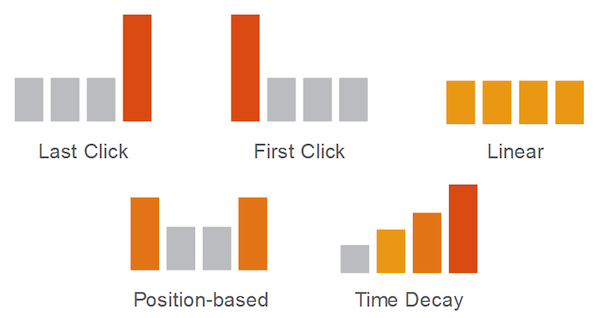
The tool examines five different common attribution models in AdWords: last click, first click, linear, position based, and time decay.

3. New DoubleClick Search Commerce Suite

DoubleClick has announced its new Search Commerce Suite. This set of tools is designed to help advertisers easily create and update text ad and PLA campaigns. It includes additional functionality to help advertisers create dynamic product listings.
Today, we're excited to introduce the DoubleClick Search Commerce Suite, a robust toolset offering a smarter, faster, product-centric layer to search management. The suite is comprised of solutions that help you automatically create and update text ad and PLA campaigns based on your product catalog, leverage real-time data to optimize against your product or category-level business goals, and measure it all with flexible, product-based reports.
We designed the DoubleClick Search Commerce Suite with products at the core, letting you efficiently build, manage, and optimize campaigns by seamlessly integrating with your existing product investments. As the only platform directly integrated with Google Merchant Center, we make your product inventory visible and accessible within DoubleClick Search – meaning there's no need to navigate a separate interface, manage a manual upload, or wait for a separate team to deliver product feed data. Instead, anyone on your marketing team can act on live updates, as they happen.
This is also the only product that is directly integrated with Google's Merchant Center.

Article Source: http://searchenginewatch.com/article/2328568/3-Google-Updates-for-AdWords-DoubleClick-Advertisers